


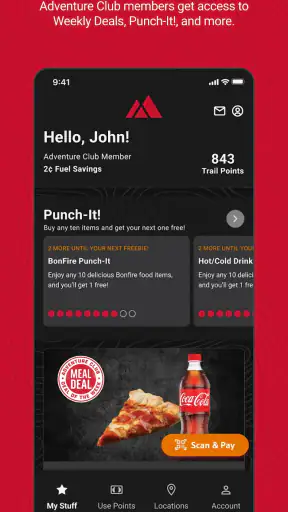
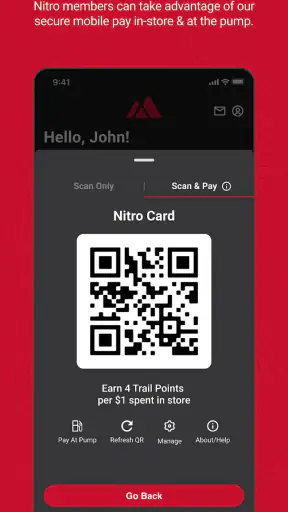
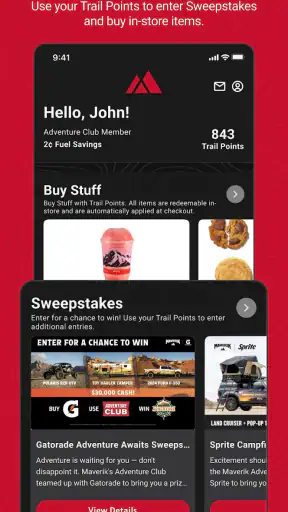
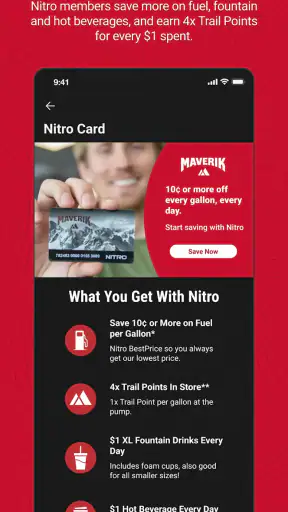
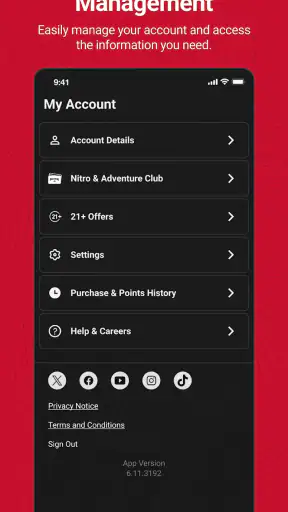
I installed Maverik Rewards expecting a straightforward loyalty app for Maverik stores, and that is exactly where it makes the most sense. It is a free business app from Maverik, Inc that brings store-finding, rewards activity, G-Cards, food-related benefits, swag opportunities, and sweepstakes into one place. I would not treat it as a general shopping tool or a replacement for a full budgeting app. Its value depends on whether Maverik is already part of your routine.
The important cost detail is simple: the app itself is free, so there is no purchase price to weigh against its features. That makes trying it fairly low-risk. The more useful question is whether the time spent checking rewards and using the app is worthwhile for you. I found that answer depends much more on how often you visit Maverik than on the app’s feature count.
How Maverik Rewards fits into everyday store visits
The app belongs to the business category, but it feels more like a digital companion to a particular retail habit. Instead of searching separately for nearby locations, keeping a physical rewards card handy, and checking promotions through different channels, I can use one app connected to Maverik’s own ecosystem. That focused approach is both its main strength and its main limitation.
On the store page, the app carries a 4.6 average from around 26 thousand ratings, with roughly 3.4 thousand written reviews and over 1 million installs. Those figures suggest that it has reached a substantial audience, but they do not change the practical test: if I rarely visit Maverik, a polished loyalty app still has limited value.
The app is rated for Everyone, which makes its general audience broad. It was released in May 2014 and is currently listed as version 7.3.13, with a minimum operating-system requirement of version 9. That older compatibility threshold is useful for people who keep a less recent phone, although the experience can still vary depending on the device and operating system actually in use.
The first useful task is finding the right store
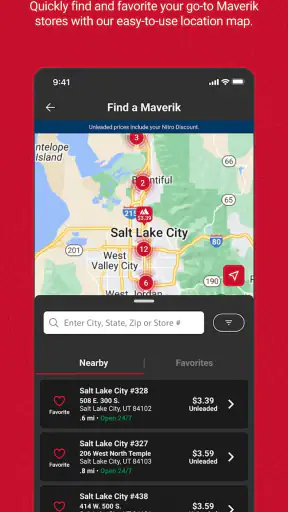
The store finder is more important than it may sound. For someone driving through an unfamiliar area, locating a Maverik store inside the rewards app keeps the search connected to the rest of the visit. I would use it before leaving rather than waiting until I am already on the road, especially when I want to decide where to stop for food or other essentials.
This also helps separate the app from a normal map application. A map is better for comparing every nearby business, planning a route, or checking several types of destinations. Maverik Rewards is more focused: it helps me identify Maverik locations and then continue into the brand’s own rewards experience. That narrower purpose is convenient when I already know which store I want, but it is not the best choice for broad local discovery.
Rewards work best when they become part of a routine
The central benefit is the chance to earn free swag, G-Cards, and food-related rewards while also entering sweepstakes. I see these as small, ongoing benefits rather than a reason to make unnecessary trips. The sensible workflow is to open the app before a planned Maverik stop, check what is relevant, complete the visit, and then review the account afterward instead of repeatedly browsing without a purchase or visit in mind.
That routine matters because loyalty programs are easy to ignore when they require a separate action every time. I would keep the app in an accessible folder and make checking it part of the same moment as deciding what to buy. The goal is not to turn a quick store visit into an administrative task. The goal is to avoid leaving available rewards or account activity unused because I forgot the app existed.
A useful trade-off appears here: the app can make repeat visits feel more organized, but it also encourages attention toward one retailer. If I am already stopping at Maverik, that focus is helpful. If I am choosing between several stores purely on price, variety, or convenience, I would compare those factors first and treat the rewards as a bonus rather than the deciding reason.
G-Cards make the app more useful for planned spending
The G-Card feature gives the app a role beyond personal rewards. It can be relevant when I want to keep Maverik-related value in one digital place or when a planned purchase involves someone else. I would still think of it as a Maverik-specific tool, not as a universal gift-card wallet. The narrower scope is manageable if the recipient or household already uses Maverik, but less attractive when flexibility across retailers matters more.
For a household, the practical question is who will actually use the account and who will remember to check it. A rewards app can be worthwhile for the person making frequent stops, while adding little for someone who visits only occasionally. Before building a routine around it, I would decide whether the account is personal or shared in practice and avoid assuming that every household member will interact with it equally.
Sweepstakes and swag change the value calculation
Sweepstakes and free swag add an element that ordinary fuel or shopping trackers do not provide. I like that the app is not limited to a dry transaction history, because occasional extras can make a loyalty program feel more engaging. At the same time, I would not assign a guaranteed monetary value to those elements. Their appeal is optional and variable, so the reliable reason to keep the app should be the everyday rewards and store access, not the hope of a particular outcome.
This distinction is important when comparing free apps. A free download can still cost attention, storage, and time. I would use the sweepstakes area when it is convenient, but I would not change my shopping habits solely to pursue it. That keeps the app’s value grounded in normal Maverik visits rather than in uncertain extras.
A realistic morning-stop scenario
Imagine I am leaving early for work and already plan to stop at Maverik for food. Before driving, I open the app to locate the most convenient store, look over the available rewards area, and keep the visit within my normal route. At the store, I use the account as intended, then check afterward to make sure the activity has been reflected. Later, I can review any G-Card or food-related value without searching through email, paper receipts, or a separate browser page.
That scenario shows where the app earns its place: it reduces small bits of friction around a visit I was going to make anyway. It does not make the commute shorter, guarantee a better price, or turn an infrequent customer into a loyal one. Its contribution is organization and the possibility of extra value attached to an existing habit.
Where the experience can feel less convenient
The biggest limitation is brand dependence. If Maverik is not near your home, workplace, or regular travel route, the store finder and rewards features become occasional tools. A broader retail-rewards app may be better for someone who shops across many chains and wants one place to compare programs. Maverik Rewards is more appropriate when the brand itself is already part of the user’s routine.
There is also a behavioral cost to loyalty apps: I have to remember to open the right app at the right time. Even when the download is free, forgotten check-ins or unused account activity can make the program feel less rewarding than expected. I would not install it just because the feature list sounds generous. I would install it if I could name several realistic situations in which I would visit Maverik and use the app during those visits.
The app’s focused design can also be a weakness for people who want a complete financial picture. It is not the place I would use to track total household spending, compare fuel costs among unrelated stations, or manage rewards from multiple brands. A budgeting app, a general map, or a multi-store loyalty wallet may serve those needs better. Choosing the right tool depends on whether the task is Maverik participation or broader shopping management.
What I would check before relying on it
I would first confirm that my phone meets the minimum operating-system requirement and that I can use the current app version comfortably. I would then make sure I understand the account flow before assuming that every benefit appears automatically. A few minutes spent learning where rewards, G-Cards, store locations, food offers, swag, and sweepstakes are displayed can prevent the common mistake of downloading an app and then never opening the sections that matter.
I would also avoid treating every visible promotion as part of my normal spending plan. The strongest approach is to use rewards on purchases I already intended to make. If a benefit requires me to buy something unnecessary, travel out of my way, or spend more time than the benefit is worth, I would skip that opportunity. Free access does not mean every in-app action has equal value.
For people concerned about age suitability, the Everyone rating makes the app broadly accessible in that respect. I would still make the same practical judgment I make with any retail account: use it with clear spending boundaries, and do not let sweepstakes or promotional elements replace sensible purchasing decisions. The app can support a shopping routine, but it should not dictate one.
Who will get the most from the free download
I think the best audience is a regular Maverik customer who wants store discovery and loyalty benefits in one brand-specific app. It is especially sensible for someone who makes repeated food or convenience stops and is willing to check the app before or after those visits. For that person, the free price removes the main barrier to testing it, while the rewards, G-Cards, swag opportunities, and sweepstakes provide several ways to find personal value.
It can also suit a traveler who already knows Maverik is part of a recurring route. The store finder may be more useful in that situation than it is for a local customer who already knows every nearby location. The app can act as a lightweight travel companion for planned Maverik stops, provided the user does not expect it to replace full navigation or broad business search.
I would be more cautious recommending it to someone who visits Maverik only once in a while, dislikes loyalty accounts, or wants a single app covering many retailers. That person may download it, forget it, and gain little. The same is true for a shopper who chooses stores exclusively through price comparison and does not want brand-specific rewards to influence decisions.
How it compares with the usual alternatives
Compared with a paper rewards card or relying on memory, the app is more convenient because it puts the Maverik relationship on the phone and adds store-finding alongside rewards-oriented features. Compared with a mobile browser, a dedicated app should feel more direct for repeat use, particularly when I want to return to the same account or store tools. The benefit is less about doing something impossible elsewhere and more about keeping related tasks together.
Compared with a general map app, it loses on breadth but gains focus. A map can compare Maverik with every other nearby business, while this app keeps me inside the Maverik experience. Compared with a multi-brand loyalty wallet, it offers a deeper connection to one retailer but does not consolidate all my programs. I would choose it alongside those alternatives when I visit Maverik regularly, not necessarily instead of them.
Compared with a budgeting application, the difference is even clearer. Budgeting tools help answer whether I can afford a purchase and where my money goes. Maverik Rewards helps me interact with one store’s rewards and related features. Neither replaces the other, but only the loyalty app is designed around Maverik-specific value.
My verdict after weighing the trade-offs
Maverik Rewards is worth trying when Maverik is already part of your normal shopping or travel pattern. The free access makes experimentation easy, and the combination of store locations, rewards, G-Cards, food-related benefits, swag opportunities, and sweepstakes gives it more practical range than a simple location finder. I would keep it installed if it helped me remember and use benefits attached to visits I was already making.
I would skip it if I rarely encounter Maverik, want one rewards app for every retailer, or expect a full shopping and money-management solution. The app’s value is not universal; it is concentrated. That is not a flaw in itself, but it means the right decision depends on frequency and habit rather than on the impressive size of the feature list.
My final recommendation is to test it during a few ordinary Maverik visits, without changing what you buy just to chase extras. If the store finder, account tools, G-Cards, and food-related rewards save effort or add useful value, the free download has earned its place. If you keep forgetting to open it or do not visit the brand often enough, uninstalling it is a reasonable conclusion. In my experience, this is a focused loyalty companion, and it works best when used that way.


